


Align: The Human Design App
3.3194.00 Reviews
App Specs
- Version
- 4.0.8
- Updated On
- License
- Free
- Downloads
- 100,000+
- Developer
- JennaZoe
- Categories
- Education
- Platform
- Android
Screenshots
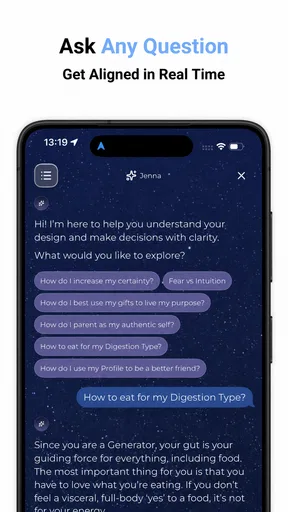
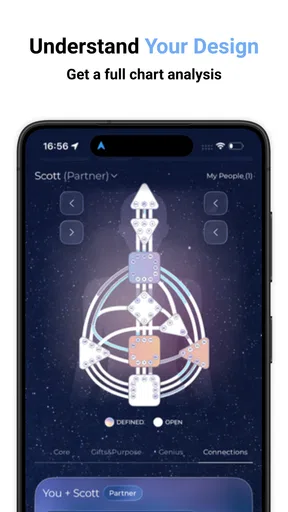
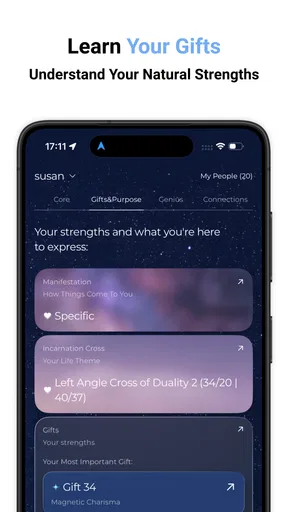
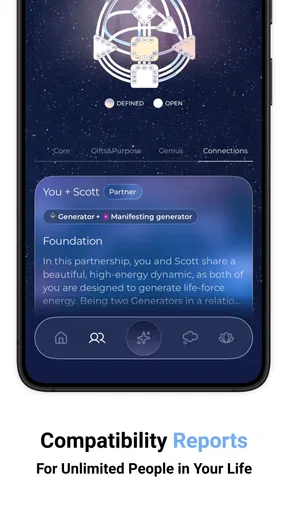
 Analysis by AppCompare
I’m drawn to tools that turn a broad interest in self-understanding into something I can actually reflect on during an ordinary day. Align: The Human Design App takes that approach through Human Design, a framework for interpreting personal patterns. I see it as a guided way to explore an idea, not as a scientific assessment or a substitute for making my own decisions. That distinction matters: the app is most useful when I treat its interpretations as prompts and see what genuinely fits.
What the free access means
Align is a free education app from JennaZoe, with optional in-app purchases listed at $4.99 per item. That gives a newcomer a low-friction way to try the app, while the paid items mean free access should not be confused with every possible part of the experience being included. I would start without spending anything, work through the material that is available, and only consider a purchase if I can identify a specific reason it would help me.
The app has a 3.5 average from 715 ratings, alongside 188 written reviews, and has passed 100K installs. Those figures suggest a real audience, but they don’t tell me whether its style will suit you. It is rated Teen, was released on August 7, 2021, and the current version is 3.0.15, with Android 10 as the minimum operating system. I’d check that your device meets the requirement before planning to use it.
What I would use it for
Human Design can feel abstract when it is presented as a collection of unfamiliar terms. Align’s value, as I see it, is in giving a curious learner a place to explore those ideas in a personal context. Rather than opening it expecting a definitive answer about who I am, I would use it to notice which descriptions lead to useful questions: When do I feel comfortable making a choice? What situations leave me second-guessing myself? Where does a suggested pattern match my experience, and where does it not?
That makes it better suited to reflection than to quick entertainment or a formal course in psychology. If you enjoy journaling, personal-development reading, or comparing different ways of understanding behavior, it can give you a structure for thinking. If you want evidence-based mental-health guidance, clinical advice, or a straightforward productivity planner, I’d choose a resource designed for that instead. A symbolic framework can be interesting, but it should not carry the weight of professional support or replace your judgment.
Using Align with a critical eye
I use this section to keep curiosity separate from certainty: Human Design can offer a vocabulary for reflection, but a compelling description still needs to be checked against lived experience. I’d also think about what I want from a learning app before deciding whether to keep exploring, so the next section can focus on the practical experience rather than treating every interpretation as a fact.
Getting Started with Align
First things first, let’s talk about getting started. The setup is pretty straightforward. You’ll need your birth details—date, time, and place. Once you’ve entered those, the app calculates your Human Design Chart, which is like a cosmic map of your personality. I was a bit skeptical initially, but the insights it provides are surprisingly spot-on.
Worth Reading Before You Choose

EA SPORTS FC Mobile 26 Is a Bigger Football Game, but It Takes Time

Flipboard Shows What News Apps Must Do Beyond the Feed

Switching to Android Auto Means Rethinking Your Driving Routine

Google Calendar Makes a Crowded Week Easier to Manage

Ludo King Makes the Most of the Minutes Between Plans

Baby Panda World Brings Quick Play to Modern Phones, but Its Game Library Feels Busy
One practical point is to enter those birth details carefully. If you are unsure of the time, don’t quietly treat a guess as exact; keep that uncertainty in mind as you read the chart. This is a useful habit with any system that depends on personal inputs: it helps separate what the app calculates from what you can confidently apply to your own life. I would also read one section at a time rather than trying to memorize a whole chart on the first visit.
The User Experience
The user interface is sleek and intuitive. I’m all about aesthetics, and Align doesn’t disappoint. The design is minimalist, which I appreciate because it keeps things from feeling overwhelming. Everything is categorized neatly, so navigating through the app is a breeze. Plus, the app is available for both Android and iOS, so whether you’re team Apple or Android, you’re covered.
Compared with a general self-help book or a broad personality quiz, a chart-based app has a more individualized starting point: the material is organized around your own Human Design profile. The trade-off is that a personalized interpretation can sound convincing even when it does not describe you particularly well. I would treat a resonant passage as a hypothesis to test, not proof. A useful check is to write down one specific example from your week that supports an idea and one that complicates it.
Diving Into Your Design
This is where the magic happens. The app explains your chart in digestible chunks. You’ll learn about your energy type, strategy, authority, and more. For me, discovering that I’m a Generator type was like a lightbulb moment. The app breaks down how to use your design to make decisions, tackle challenges, and interact with others. It’s like having a personal life coach, but without the hefty price tag.
I’d be careful with the life-coach comparison in practice: an app can offer language and prompts, but it cannot understand the full context of a difficult choice. For everyday decisions, I might use a chart concept to pause and examine my habits, then weigh the ordinary factors too—time, responsibilities, other people’s needs, and likely consequences. This makes the framework a conversation starter with myself rather than a rulebook that decides for me.
A realistic way to try that is to open the app after a frustrating day at work, read one relevant explanation, and note what happened before reacting to it. Perhaps a description helps you recognize a familiar tendency; perhaps it does not fit. Either result can be informative if you stay honest. I would avoid making a major relationship, health, or money decision solely because a chart seems to point in one direction.
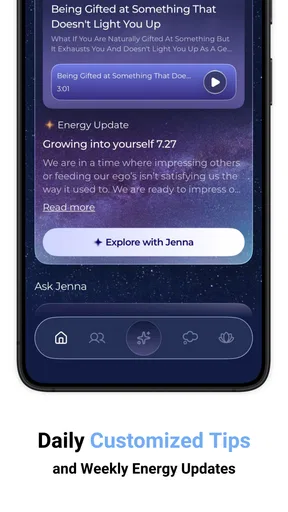
I particularly enjoyed the daily tips and affirmations Align provides. They’re tailored to your specific chart, which makes them feel incredibly personal. Some days, it’s just what I need to hear to stay on track.
To get more than a momentary boost from a daily prompt, I would connect it to a concrete action. If a tip encourages patience, for example, I could use it as a reminder to wait before sending a tense message, then decide based on the situation rather than following the prompt automatically. That small step turns a reassuring line into a testable practice. It also helps me notice whether the advice is consistently helpful or merely pleasant to read.
Learning and Growing
If you’re a self-improvement junkie like me, Align offers plenty of resources to dive deeper. There are articles, guides, and even community forums where you can connect with fellow users. I spent hours exploring these features, and it felt like being part of a global community of like-minded individuals.
The community side can be appealing if you want to hear how other people interpret the same broad ideas, but I would keep personal boundaries in mind when sharing. Birth details and reflections can feel intimate, so I’d only post what I’m comfortable discussing with strangers. I’d also treat other users’ experiences as perspectives, not extra confirmation that a particular interpretation must be true for me.
One of the standout features for me was the reflection journal. It’s a space where you can jot down your thoughts and experiences as you learn about your design. I found this incredibly helpful for tracking my growth and understanding patterns in my behavior.
A simple journal routine makes that tool more useful: record the date, the idea you were considering, what happened, and whether the interpretation helped. After a few entries, look for repeated real-world examples rather than relying on a single memorable moment. This can keep self-reflection grounded and reveal when an idea is too broad to guide you. If you already keep a paper journal, the app’s journal is most worthwhile when having the chart and notes together makes you more likely to write.
Integration and Compatibility
Align also plays well with other tools. It syncs effortlessly with calendar apps to remind you of important dates and personal insights. I love how it integrates with my daily routine, making it easy to apply Human Design principles without extra effort.
The app’s developers are constantly rolling out updates, which is great because it means they’re actively improving the app based on user feedback. It’s always nice to see an app that evolves with its community.
For me, the broader comparison is about what kind of learning experience you want. A book can offer a longer, more linear explanation; a general personality quiz is usually easier to finish quickly; and a journal leaves the interpretation entirely in your hands. Align sits closer to an ongoing, chart-centered guide. That focus is its appeal if Human Design is already interesting to you, but it is also a limitation if you want a neutral overview of several self-knowledge approaches rather than one framework.
Who is likely to get value
I’d recommend trying Align if you’re curious about Human Design, enjoy reflecting on personal patterns, and are comfortable deciding for yourself which ideas are useful. It may suit someone who likes a daily prompt but wants more context than a standalone affirmation, or someone who wants to keep a record of how an interpretation holds up in real situations. The free entry point makes it easier to explore before deciding whether any optional purchase is worth considering.
I’d skip it if you dislike spiritual or symbolic systems, expect a diagnosis, or want a precise plan for changing a behavior. It may also frustrate readers who prefer research-led explanations, because the central appeal is a particular interpretive framework rather than a comparison of competing theories. If your main goal is structured learning, a course or book with a clear syllabus may be a better fit; if you need help with distress or a serious life problem, seek qualified support instead.
If you are weighing the optional items, I would ask what exact need the purchase would meet and whether the free material has already shown that the app’s approach works for you. The listed price is $4.99 per item, so it is a per-item purchase rather than a reason to assume the entire app has one all-inclusive price. I would avoid buying out of fear of missing out; a clear, personal use case is a better reason.
Final Thoughts
So, is Align: The Human Design App worth your time? Absolutely. Whether you’re a seasoned Human Design enthusiast or a curious newbie, this app offers valuable insights into understanding yourself and others. It’s like having a personal guide to navigate life’s complexities with a bit more clarity and confidence.
My recommendation comes with a boundary: I’d use it as a reflective companion, not an authority. Its strongest value is helping an interested person engage with Human Design in a personal, organized way; its weakest fit is for anyone who needs neutral evidence, professional advice, or a practical tool that works independently of that system. Start with the free access, take your time with the chart, and keep notes on what genuinely helps. If the framework feels meaningful after that, you can decide whether continuing is worth it to you.
If you’re ready to embark on a journey of self-discovery, you can download Align from the Google Play Store or the Apple App Store. Trust me, it’s a trip worth taking.
Pros
- Intuitive user interface for easy navigation.
- Comprehensive chart analysis and reports.
- Regular updates with new features.
- Personalized insights for self-discovery.
- Available for both Android and iOS.
Cons
- Requires in-app purchases for full features.
- Limited offline functionality.
- Initial setup can be time-consuming.
- Some features may seem complex to beginners.
- Notifications can be overwhelming.
FAQs for Align: The Human Design App
What is Align: The Human Design App?
Align: The Human Design App is a tool designed to help users explore the concept of Human Design, which combines elements from astrology, I Ching, Kabbalah, and the Chakra system. The app offers personalized insights into your unique energy type and provides guidance on how to align your life with your natural strengths.
How does Align: The Human Design App work?
The app requires you to input your birth details, including time, date, and location. It then generates your Human Design chart, offering insights into your energy type, profile, and authority. Based on this information, the app provides personalized guidance on decision-making, relationships, and personal growth.
Is Align: The Human Design App suitable for beginners?
Yes, Align: The Human Design App is suitable for beginners. It provides a user-friendly interface and detailed explanations of each element within your chart. The app includes educational resources and tutorials that help users understand their design and how to apply it to their daily lives.
What features does Align: The Human Design App offer?
Align offers features such as personalized Human Design charts, daily insights, and actionable advice tailored to your specific design. It also includes a glossary of terms, educational articles, and the ability to track your progress and insights over time. This ensures a comprehensive learning experience.
Is there a cost associated with using Align: The Human Design App?
Align offers a free version with basic features, but to access premium content, such as in-depth reports and personalized guidance, a subscription is required. This provides users with a more detailed understanding and application of their Human Design chart, enhancing the overall experience.


